







Casino Overview
Load the site in your phone browser and the lobby of 7Gear shows its game categories first, with the account buttons close by. There is no sportsbook here: the brand works purely as a casino. The cashier, the games and the help pages all sit in the same browser tab. No separate 7Gear app is listed. The mobile browser is the way in, and it needs no download or storage space.
Regulation comes from Curaçao, the only licence named for the operation. It is not approval from a UK regulator. Read it as an offshore permit and judge the site on its terms, limits and payouts. Your account runs in one of three fiat currencies: GBP, EUR or USD. Pick the one that matches your card or e-wallet. Conversion fees then stay out of every deposit you make from the phone.
Inside the lobby, the 7Gear catalogue spreads across nine categories, from slots and live tables to bingo, scratch cards and virtual sports. More than 10 studios feed it, and NetEnt, Pragmatic Play and BGaming are among them. Tiles are small but readable on a narrow screen. Tap a tile to open the game. Short loading screens are normal on mobile data.
Beyond the games, players get a VIP programme, crypto payments in five coins and help around the clock. Live chat, email and an FAQ cover that support, each explained further down. A practical phone tip: add the site to your home screen from the browser menu. The lobby then opens with one tap instead of a typed address.
How to Create an Account
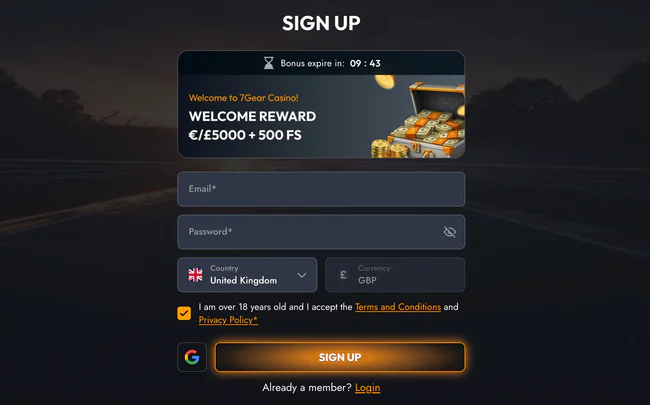
Opening an account takes one short form, and the 7Gear sign up is brief enough to finish on a phone in a single sitting. It gathers what the casino needs to create your login and tie the balance to a currency. After that, the cashier accepts a £20 minimum deposit. New accounts also gain access to the welcome package of 100% up to €5,000 plus 500 free spins.
Registration Steps
Find the sign-up control at the top of the lobby and tap it. A compact form appears: type your email, pick a strong password and set GBP, EUR or USD as the account currency. Personal details follow. Enter them exactly as they appear on your ID. Small spelling slips here tend to resurface at the first withdrawal and slow it down.
Before you confirm, tick the box accepting the terms and declare your age. Skim the bonus terms at the same moment. Submit the form, then open your mailbox on the phone if a confirmation message arrives. Follow its link and you return to the lobby, signed in. Let your phone's password manager store the new login. Retyping it on a small keyboard is where errors creep in.
Account Verification
Identity checks usually arrive before the first payout rather than at sign-up. Expect a request for an identity document and a recent paper that carries your home address. The phone camera does the job well: lay each page flat, shoot in daylight and keep all four corners in frame. Upload the images from the account area. Then watch your inbox for the answer.
Bonuses at 7Gear

New players at 7Gear can take a welcome package of 100% up to €5,000 plus 500 free spins. The cash half is a deposit match, so it grows with what you pay in, up to the cap. The spins are tied to Dogg Dollars. Limits on stake size and time apply as well. Check those key terms before you tap the claim button.
| Parameter | Value |
|---|---|
| Welcome Bonus | 100 % |
| Bonus Cap | €5000 |
| Bonus Spins | 500 (Dogg Dollars) |
| Min. Deposit | €20 |
| Validity | 3 days |
| Maximum Bet | €5 |
Welcome Bonus
Three conditions shape the welcome offer, and each one matters on a phone where quick taps are easy. The qualifying deposit is €20 or more. While bonus money is active, a single bet cannot go above €5. The whole package runs for 3 days. Plan sessions you can actually fit into that window. The wagering figure sits in the bonus terms; read it before you accept.
How to Claim the Bonus
Claiming starts in the cashier, not in a separate promo area. Open it from the account menu, pick a payment method and type a deposit of at least €20. If an opt-in box or bonus selector shows up, tick the welcome offer before confirming. Skip that step and the deposit may go through without the match. Adding it afterwards is not guaranteed.
Once the payment clears, the bonus balance and the free spins should appear in your account. Open Dogg Dollars from the slot list to use the spins. Keep each stake at €5 or lower while the bonus is live. A phone tip: lock auto-rotate before you spin. A sudden tilt can shift the layout and put your thumb on the wrong bet button.
Reload Bonuses
No standing reload offer is listed next to the welcome package at 7Gear. That means nothing extra is promised for later deposits. Regular players do have a VIP programme, covered in its own section below. Open the promotions tab now and then, because operators change their deals. Turn on promotional emails if you want news without opening the lobby every day.
Games at 7Gear
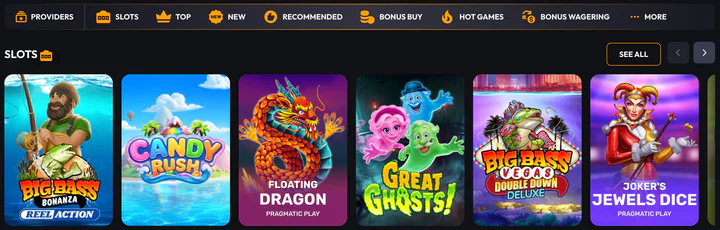
The lobby at 7Gear splits into nine categories: slots, live casino, table games, crash games, jackpots, poker, bingo, scratch cards and virtual sports. More than 10 studios supply the titles. BGaming, NetEnt, Microgaming, Yggdrasil, Red Tiger, Thunderkick, Quickspin and Pragmatic Play all appear among them. On a phone, the category filters are the fastest route through a catalogue of this size.
Online Slots
Slots fill the largest share of the lobby. The six tiles above this text already point to titles players open often. Formats vary by studio. Hold-and-win features sit next to jackpot slots and simpler reel sets, and each studio brings its own pace and volatility. Open the info screen inside a slot to see its paylines and bonus rounds before you spin.
Some slots open in portrait, while others ask you to turn the phone sideways. Rotate the screen if the reels look squeezed. When you already know a title, type it into the search field. Scrolling through games from more than 10 studios on a small screen gets slow. Mark a few favourites so they sit one tap from the lobby.
Live Casino
Live casino tables stream real dealers. They need a steadier connection than slots do. On mobile data, lower the video quality if the stream offers that setting. Bets go down through on-screen chips placed over the video. Join a table on Wi-Fi when you can. A dropped stream in the middle of a round is annoying, even when the bet still settles.
Table Games
Table games at 7Gear cover digital versions of the classic card and wheel games, played against software instead of a dealer. They are lighter on data and quick to load. That makes them a good fit for short sessions on a commute. Tap the rules screen before the first hand. Variants differ in small details that change the house edge.
Other Games
Past slots and tables, the lobby adds crash games, jackpots, poker, bingo, scratch cards and virtual sports. Crash rounds last seconds and reward a steady thumb on the cash-out button. Scratch cards and bingo move slower and work one-handed. Virtual sports are simulated events, not real matches. Play crash titles with the phone held still, never while walking.
Deposits and Withdrawals

The 7Gear cashier opens from the account area and behaves like a checkout page in the mobile browser. Visa and Mastercard work there alongside Skrill, Neteller, MiFinity and bank transfer. Crypto users can pay in BTC, BCH, ETH, LTC or DOGE. Fiat balances stay in GBP, EUR or USD, depending on the currency picked at sign-up. The table under this paragraph lists the limits and timing of each method.
| Payment method | Min. deposit |
|---|---|
| Bank transfer | €20 |
| Visa | €20 |
| Cryptocurrency | 1 BTC |
Deposits
Pick a method you are happy to use for payouts too. Casinos usually return money along the route it arrived by. Confirm your email and complete the profile before the first payment, because an unfinished account can stall at the cashier. Type the amount, approve the charge in your banking app or wallet and wait for the balance to refresh. For crypto, copy the wallet address with a long press rather than retyping it.
Withdrawals
Payouts are requested from the same cashier screen. Switch to the withdrawal tab, select the method and enter the amount. A monthly ceiling of €30,000 applies to withdrawals. Larger wins are paid out in portions that fit under that cap. If you have not passed the identity check yet, expect it before the first payout is released.
Pending requests appear in the transaction history, which is easy to open from the phone. Avoid cancelling and resubmitting a request, because that restarts processing. Keep the payout method in your own name. Third-party cards and wallets usually get refused. Screenshot the confirmation screen, and the reference is ready if you need to ask support about a delay.
7Gear Security
Account protection at 7Gear starts with the Curaçao licence, the only regulatory link named for the brand. It is an offshore permit, not a British one. Players in the United Kingdom should weigh it that way. Look at the terms, the withdrawal cap and how payouts arrive, and decide from there.
Your own part of security happens on the phone. Use a password that belongs to this account and nowhere else. Lock the device with a PIN or biometrics. Never stay signed in on a borrowed tablet or a friend's handset. Identity checks protect you as well: they stop anyone else from cashing out your balance.
Limits belong to safe play too. A time-out fits a brief pause. Self-exclusion is built for a longer break away from gambling. If you cannot find these tools in your settings, ask support which ones are active on your account. Set any limit straight after a session, while the numbers from it are still fresh in your mind.
7Gear Support
Help at 7Gear runs 24/7 through three routes: live chat, email and an FAQ. The table below sets out each channel. Live chat is the quickest from a phone. You type in the same browser tab, without leaving the game or the cashier, and answers arrive in the same thread.
| Support Channel | Details |
|---|---|
| Frequently Asked Questions | Help Section of the Site |
| Email Contact | Reply by Email |
| Chat | 24/7 |
Email suits questions that need attachments, such as a document the verification team rejected. Write from the address linked to your account. Put your username in the first line. The FAQ deals with routine points like payment methods and bonus rules without waiting for anyone to reply.
Each stage has its own best channel. Use the FAQ before signing up, chat during a deposit problem and email after a verification request. Copy transaction IDs from your cashier history straight into the chat. It cuts the back-and-forth on a small screen.
Loyalty Programme
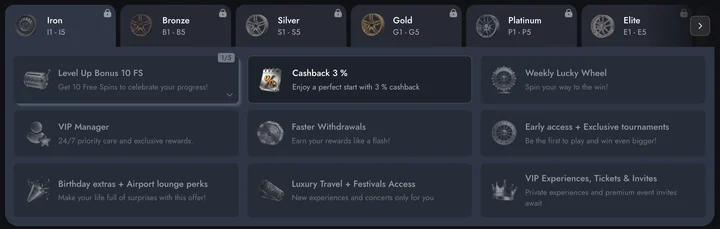
Regular players at 7Gear are covered by a VIP programme. Its tiers and rewards are not spelled out in the public details of the brand. Ask in live chat or check the promotions area for the current structure. Knowing the rules first stops you chasing a reward that does not exist.
Programmes of this kind generally track real-money stakes. Active players move up as they keep playing. Bonus-funded bets may count differently, or not at all. Read the programme terms before you assume every spin earns progress. Those terms decide what each level actually gives you.
From the phone, check your status after a session through the account menu or a quick chat message. Never raise stakes just to reach the next level. Keep to the amount you planned for the session and let the status follow on its own.
7Gear Login
The 7Gear login button sits at the top of the page, beside the sign-up control. Tap it, type the email and password you registered with and confirm. On a phone, the password manager can fill both fields in one tap. Enable biometric unlock for it, and signing in takes seconds.
A lost password is fixed through the reset link under the login form. Enter your registered email, open the message on the phone and choose a new password. If nothing arrives within a few minutes, check the spam folder. After that, reach live chat for help.


